Category: edci335

Blogpost 4 : Using Video for Interaction.

For this post, I selected a YouTube video that introduces probability concepts through simple examples. Since our Interactive Learning Resource focuses on empirical and theoretical probability, I would use this video as an introduction before learners participate in hands-on activities. Bates (2022) explains that learning is most effective when students actively engage with learning materials rather than passively consume information.

 What kind of interaction would the video require from your students?

The video requires learners to actively watch, listen, and think about the probability examples being presented. Although students are not required to respond directly, they are encouraged to make predictions and consider why certain outcomes occur. This supports interaction with the content and helps learners connect new information to prior knowledge.

In what way are they likely to respond to the video on their own?

Students may pause the video to take notes, write down examples, or try solving probability questions before the answers are revealed. They may also begin thinking about how probability applies to everyday situations such as weather forecasts, sports statistics, and games of chance. These learner-generated responses encourage reflection and deeper understanding.

If you selected a video, what activity could you suggest that they do after they have watched the video?

After watching the video, students would complete the “Heads or Tails: Is it 50:50?” activity. Learners flip a coin multiple times, record their results, and compare their experimental probability with the theoretical probability of 50% heads and 50% tails. This activity helps students understand that real-world results do not always perfectly match expected outcomes. It also develops skills in data collection, probability calculations, and critical thinking.
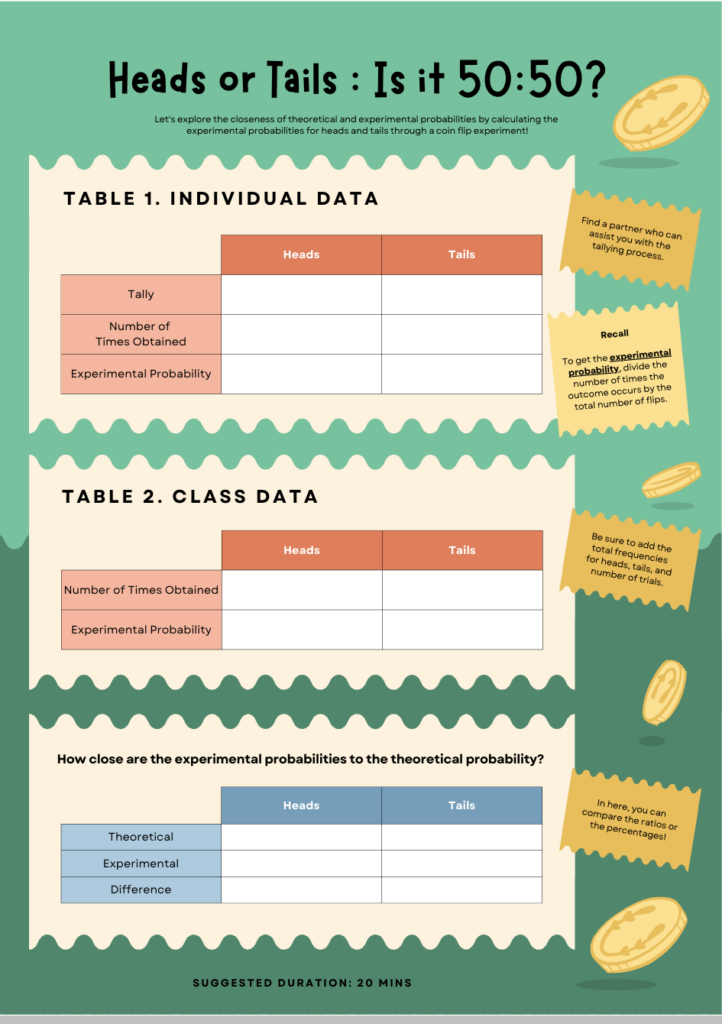
Figure 1. Heads or Tails: Is it 50:50? Activity

How would students get feedback on the activity?

Students could compare their results with classmates through a discussion board or shared class data sheet. Feedback could also be provided through an H5P activity with automatic responses. By comparing different outcomes, students can better understand how probability varies and why larger sample sizes often produce results closer to theoretical expectations.

How will you address any potential barriers for your learners in the use of this video to ensure an inclusive design?

To support all learners, I would choose a video with captions and clear audio. Written instructions for the activity would also be provided so students can review the content in multiple formats. Learners can pause, replay, and review the video at their own pace. Combining visual, auditory, and hands-on learning opportunities aligns with inclusive learning design principles and helps make the lesson accessible to a wider range of learners.

Overall, I think combining a short instructional video with an interactive probability activity creates meaningful engagement and helps learners develop a stronger understanding of probability concepts.

References

Bates, A. W. (2022). Chapter 10.6: Interaction. In Teaching in a Digital Age (3rd ed.).BCcampus. 
https://pressbooks.bccampus.ca/teachinginadigitalagev3/chapter/pedagogical-roles-for-text-audio-and-video/

EDCI 335 Blog Post 3 – Prompt 1: How will your interactive learning resource specifically ensure that the needs of all learners can be met?

Our learning blueprint design focuses on creating an interactive probability learning resource that is engaging, flexible, and accessible for all learners. After learning about Universal Design for Learning (UDL) and accessible content, I realized that students learn in many different ways, so learning activities should be designed to support learner variability instead of assuming there is one “average learner.”

Since our topic is probability, we want students to learn through hands-on and interactive experiences instead of only reading information or completing worksheets. Our learning resource will include activities like spinning a wheel, rolling dice, flipping coins, and predicting outcomes to help students connect probability concepts to real-life situations. These kinds of activities make learning more engaging and can help students better understand ideas like chance, outcomes, and likelihood.

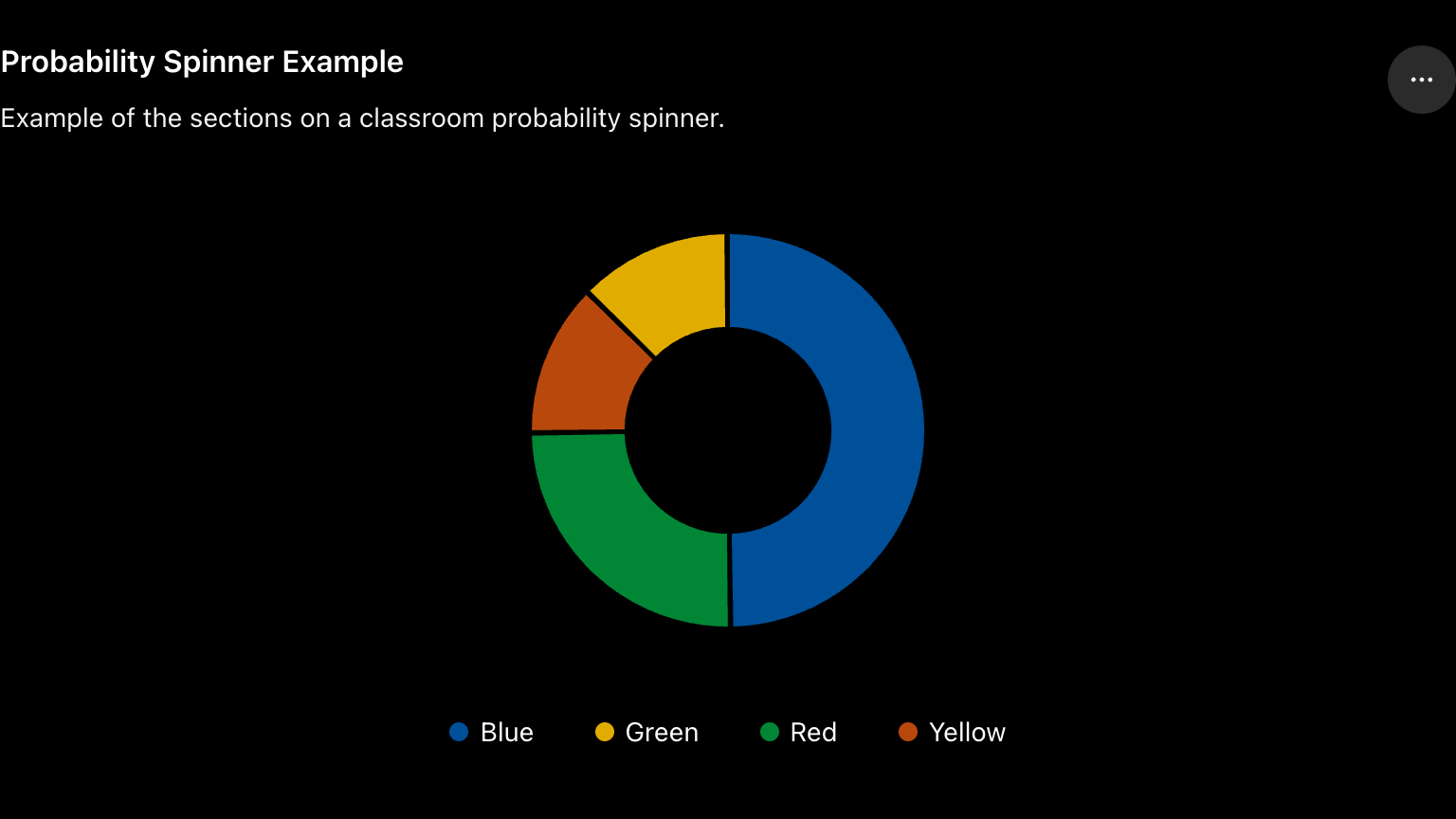
Example Probability Activity

Students could use a virtual spinner to predict which colour it will land on most often. This helps learners visually understand probability and compare outcomes through experimentation instead of only memorizing definitions.

To support different learners, our resource will present information in multiple formats. Instead of relying only on written explanations, students will also have access to visuals, short videos, audio instructions, and interactive games. For example, learners may watch a short animation about probability, complete drag-and-drop activities, or test predictions using a virtual spinner. This connects to the UDL principle of providing multiple means of representation and engagement because students can interact with content in ways that work best for them.

Accessibility is another important focus in our blueprint design. The readings about accessible content showed how small design choices can reduce barriers for learners. Because of this, we would include captions on videos, readable fonts, clear headings, simple instructions, and alt text for images. We also want the resource to be easy to navigate so students can focus on learning instead of struggling with the technology itself.

Another way our learning resource supports all learners is by allowing students to demonstrate understanding in different ways. Instead of only answering written questions, learners could explain probability concepts through discussion, complete interactive challenges, or create their own examples using games or visuals. Giving students different options recognizes learner variability and creates more pathways for success.

Overall, our learning blueprint design focuses on creating a probability learning environment that is interactive, inclusive, and supportive for all learners. Inclusive design and UDL helped me understand that educational resources should be flexible and accessible so that every student has an equal opportunity to participate and succeed.

References

Universal design – EDCI 335. (n.d.). EDCI 335. https://edtechuvic.ca/edci335/universal-design/

Inclusive learning design – EDCI 335. (n.d.). EDCI 335. https://edtechuvic.ca/edci335/inclusive-learning-design/

BlogPost #2: Learning Through Structure: Exploring Direct Instruction.

When I first started thinking about different approaches to learning design, I assumed that student-centered methods like inquiry-based learning would always be the best option. However, after reading about direct instruction, I realized that there is still an important place for structured, teacher-guided learning, especially in online environments.

📚 What is Direct Instruction?

Direct instruction is a teaching approach that emphasizes clear explanations, structured lessons, guided practice, and ongoing feedback. Rather than expecting learners to discover information entirely on their own, the instructor provides support and guidance throughout the learning process.

Kenny (1980) explains that effective direct instruction includes clear learning goals, sufficient instructional time, monitoring student performance, and immediate feedback. Research discussed in the article also found that students generally achieve better outcomes when teachers provide strong guidance, structured interactions, and frequent opportunities to respond. These characteristics help learners build foundational knowledge and skills before moving on to more complex learning tasks.

💻 Direct Instruction in Technology-Mediated Learning

Although online learning often focuses on independence and flexibility, I think direct instruction can still play an important role. Learning online can sometimes feel overwhelming, especially when students are introduced to unfamiliar concepts without enough support.

For example, instructional videos, guided tutorials, step-by-step demonstrations, and interactive quizzes can all be designed using direct instruction principles. These tools help learners understand expectations and provide a clear path through the content.

One idea from the reading that stood out to me was the importance of immediate feedback. Kenny (1980) notes that corrective feedback and opportunities for practice can improve student performance and reduce errors. In an online environment, this could be achieved through quizzes, self-check activities, and automated feedback that helps learners understand mistakes as they occur.

🎯 My Takeaway

While direct instruction is sometimes criticized for being too teacher-centered, I believe it provides an important foundation for learning. Not every learner is ready to jump into inquiry-based or self-directed activities without first developing basic knowledge and skills.

For my own learning resource, I can see direct instruction helping learners gain confidence through clear explanations, structured content, and guided practice before moving on to more independent activities. Rather than limiting learning, I think effective direct instruction can create the support learners need to succeed.

💡 Key Takeaway

Direct instruction remains a valuable approach because it provides structure, guidance, and feedback that help learners build strong foundations for future learning.

References

Kenny, D. T. (1980). Direct instruction: An overview of theory and practice. Journal of the Association of Special Education Teachers15(12), 17-22.

Blog Post #1 – The Downside of Flexible Learning.

Categories: edci335, Post 1

One technology-mediated learning experience that I struggled with was PHIL 201, which was a required university course delivered completely online and asynchronously. When I first started the course, I was actually excited because I thought the topics sounded interesting and different from the types of courses I normally take. I liked the idea of being able to work independently and manage my own schedule. Since the course was asynchronous, I expected it to feel flexible and less stressful.

At the beginning, I was motivated and kept up with the readings and lectures pretty consistently. However, after a few weeks, my motivation slowly started to shift. Because there were no live classes or regular interaction with other students, it became easy to fall behind without realizing it. Once I missed a few readings, catching up started to feel overwhelming, especially because many of the philosophical concepts built on each other.

One of the biggest challenges for me was that some of the concepts were difficult to fully understand on my own. Even though the course materials explained the theories, I often felt like I needed discussion or conversation to process the ideas properly. Reading complex philosophical arguments independently sometimes made the learning feel isolating rather than engaging. Looking back now, I can connect this to ideas from constructivism and connectivism, where learning becomes more meaningful through interaction, discussion, and shared understanding with others.

I also think the course struggled to support competence and relatedness. Since everything was self-paced, there was a lot of autonomy, but sometimes too much freedom made it harder to stay motivated and organized. Without regular check-ins, class discussions, or collaborative activities, I didn’t feel very connected to the course or to other learners. It often felt like I was trying to figure everything out completely alone.

This experience made me realize that motivation is influenced a lot by course design, not just personal effort. If the course had included more opportunities for interaction, smaller discussion groups, or optional live sessions to talk through difficult concepts, I think I would have stayed more engaged and confident throughout the semester. Even simple ways to build connection and accountability could have made a big difference in my learning experience.

References

Ertmer, P. A. & Newby, T. (2018). Behaviorism, Cognitivism, Constructivism: Comparing Critical Features From an Instructional Design Perspective. In West, R. E. (Ed.), Foundations of Learning and Instructional Design Technology (1st Edition): Historical Roots and Current Trends (pp. 133-151). EdTech Books. https://edtechbooks.org/lidtfoundations/behaviorism_cognitivism_constructivism

Test Learning Design Post

This post  will appear in a few places:

  1. in the blog feed on the front of your website
  2. in the Learning Design menu on your website. This is because we have applied the “edci335” category to this post and the menu item “Learning Design” has been created from the category “edci335.” For every post you make for this course, please assign the “edci335” category to it. You are welcome to use this blog for your personal hobbies or for other courses, in which case, you could create additional menu items and categories for them.
  3. if you give permission, your posts categorized “edci335” will be aggregated onto the Blog Feed on the EDCI 335 Course Website.

Feel free to delete this post once you understand this. If you have any questions, please reach out to your instructor.

© 2026 Manveen Kaur

Theme by Anders NorenUp ↑